- product update
- feature
November update: leaner chats, smarter tools, and code that runs
See what fills your context, load big tool sets on demand, and run code right in your chats.

Vicente González, Founder
3 min read
We just shipped our biggest round of updates since launch. Most of them do one thing: make every token count, so your chats stay fast and your bill stays small.
Here is what changed, and why.
See what's filling your context
Every model has a context window, and everything in a chat competes for it: the system prompt, the definitions of your tools, your messages and the results your tools send back. Until now you had to guess how full it was.
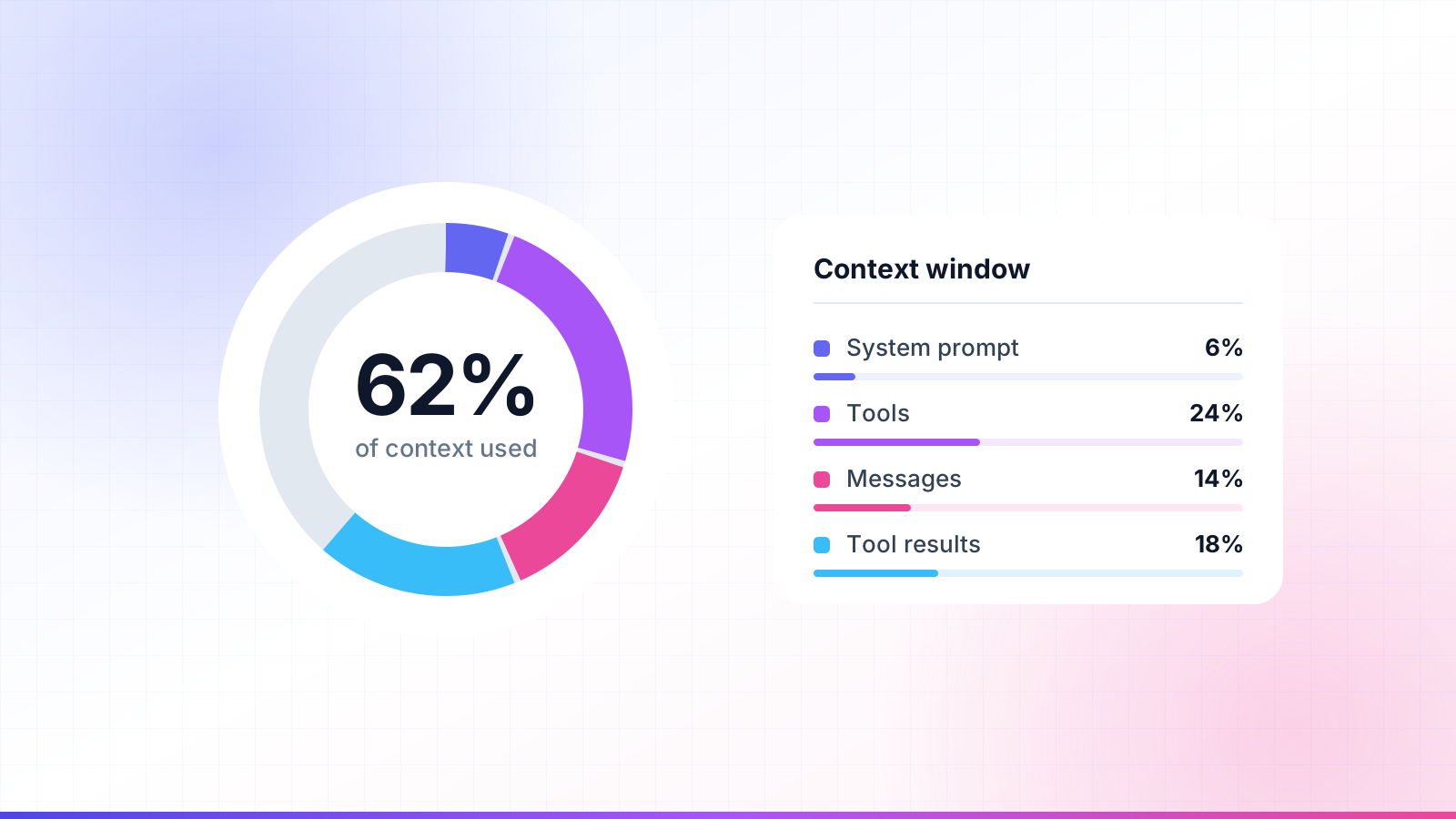
There is now a ring next to the message box that shows how much of the model's context window your chat uses. Click it to see the split between four parts:
- System prompt: the instructions every chat starts with
- Tools: the definitions of the tools your MCP servers offer
- Messages: what you and the model have written
- Tool results: what your servers returned
If one server is quietly eating half your window before you type a word, you will now see it.
Big tool sets load on demand
Connecting a few large MCP servers used to put every tool definition into every request. With enough tools, a one-word message could cost a surprising number of tokens.
Now, when your connected servers bring a lot of tools, the model starts with just their names. It loads a tool's full definition only when it needs that tool, and tools it has already used stay loaded for the rest of the chat.
Small tool sets work exactly as before. And if tools still take up much of your context, the ring tells you.
Turn single tools on and off
Most servers ship tools you never call. Each server now has a Manage tools screen where you can switch off the ones you don't use. It comes with:
- Search, to find a tool by name
- Bulk switches, to turn everything on or off at once
- A rough token cost per tool, so you know what each one costs you
A tool you switch off is never sent to the model, so it costs nothing. Your choices are saved on the device you make them on.
Lower costs with prompt caching
Claude chats are now cached at every step, including long tool loops where the model calls one tool after another. New chats also reuse your cached setup, so the part every chat shares is not billed at full price each time.
In practice, replies come back faster and cost less on your OpenRouter key. There is nothing to turn on.
Skills load only what they need
Skills used to send their full instructions with every chat, whether the model used them or not. Now it works in steps:
- The model sees each skill's name and description.
- It reads the full instructions only when it decides to use a skill.
- It never receives the same skill twice in one chat.
You can keep more skills switched on without paying for the ones a chat doesn't use.
Run code right in your chats
Chats can now run code. The model can write and run Python 3.13, JavaScript and SQLite in a sandbox with no network access, which makes it far better at anything that needs real computation: parsing a file, checking a number, reshaping data.
Two things build on this:
- Skills can run their bundled scripts, so a skill can ship working code and not only instructions.
- The model can chain several MCP tool calls in one script, so a task that took many round trips can finish in one.
Code execution is on by default. You can turn it off any time in Chat Settings.
Smaller things
- We redesigned our emails and added email verification at sign-up.
- Share links can now actually be turned off.
- Errors are clearer when an API key is missing.
- A long list of smaller fixes across the app.
Try it and tell me what you think
Everything above is live now. Open a new chat, connect a server and watch the ring.
If something feels off, or there is a thing you wish the app did, write to support@modelcontextchat.com. I read every message.
Vicente, founder of Model Context Chat